Running GRPO on GSM8K Dataset#
This guide walks you through how AReaL runs the GRPO algorithm on the GSM8K dataset.
We’ll use the example training script
examples/math/gsm8k_rl.py
and configuration file
examples/math/gsm8k_grpo.yaml
to explain the key concepts step by step.
Note: The current training script uses
PPOTrainerto abstract the infrastructure setup. This guide documents the low-level components (FSDPPPOActor, RemoteSGLangEngine) for advanced users who want to understand the internals.
Overview: How AReaL Works#
The diagram below shows how AReaL launches and executes one asynchronous training step for GRPO on GSM8K:
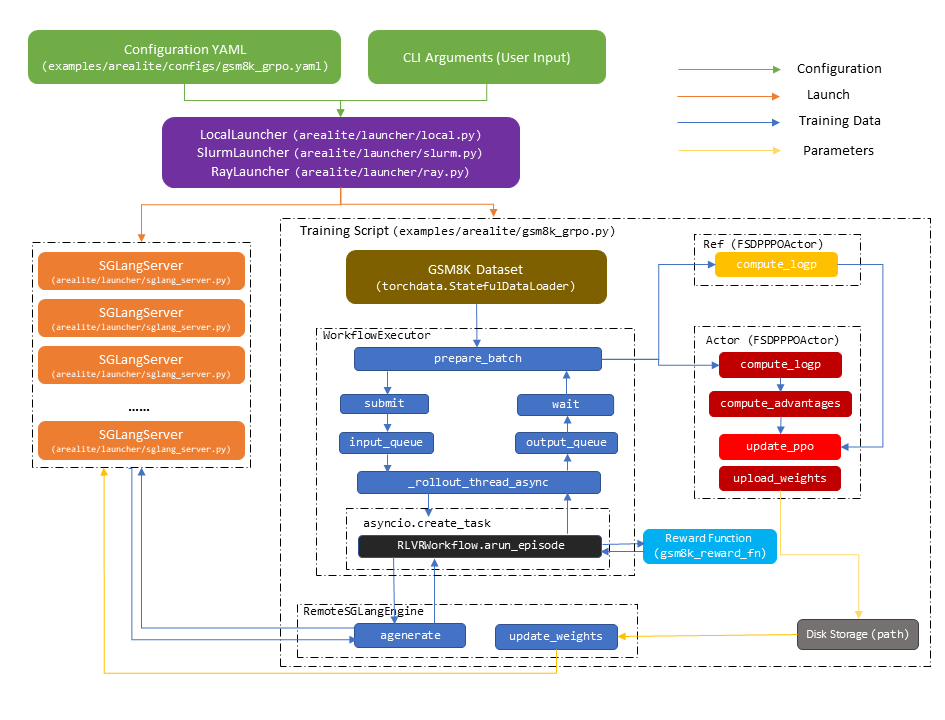
Architecture: AReaL separates inference and training across different GPUs. It first
launches inference HTTP servers (SGLang or vLLM), then starts an SPMD training script
with torchrun on a separate set of GPUs.
Training Step Flow:
Submit Prompts: Send prompts from the dataset to
RemoteSGLangEngine, which runsRLVRWorkflowin streaming modeGenerate & Reward: The workflow interacts with remote
SGLangServerinstances to generate sequences and compute rewardsBatch Aggregation: Once enough outputs are ready, aggregate them into a training batch for
FSDPPPOActorTrain: Compute losses and update model weights in
FSDPPPOActorSync Weights: Transfer updated weights back to remote
SGLangServerinstances
In the following sections, we’ll walk through the code to explain each component in detail.
Launching the Experiment#
AReaL provides three launchers for different environments. As shown in the quickstart guide, you can launch experiments with:
# Local machine (using subprocesses)
python -m areal.launcher.local <training script> --config <config file> <cli args>

# Ray cluster
python -m areal.launcher.ray <training script> --config <config file> <cli args>

# Slurm cluster
python -m areal.launcher.slurm <training script> --config <config file> <cli args>
How Launchers Work#
Training Script: An SPMD Python script that serves as the experiment entry point.
Launcher Responsibilities:
Launch inference servers (SGLang/vLLM) on their dedicated GPUs
Start the training application with
torchrun, where each process occupies one GPU and contains:An inference client connecting to all servers
A training engine running forward/backward passes
Key Configuration:
allocation_mode: Determines which backend to use (SGLang/vLLM), number of GPUs for training/inference, and parallel strategiesFor distributed launchers (Ray/Slurm), inference servers use wrappers (
sglang_server.py,vllm_server.py) to handle networkingAfter servers start, launchers set
AREAL_LLM_SERVER_ADDRSenvironment variable with server addresses
Configuration Files#
Configuration files are YAML files that specify options from
areal/api/cli_args.py.
You can override settings via CLI:
# Example: change model and attention backend
python -m areal.launcher.local examples/math/gsm8k_rl.py \
    --config examples/math/gsm8k_grpo.yaml \
    actor.path=Qwen/Qwen3-1.7B \
    +sglang.attention_backend=triton
In your training script, parse the configuration:
config, _ = load_expr_config(args, GRPOConfig)
config: GRPOConfig
See CLI Reference for all available options.
Dataset Loading and Preprocessing#
AReaL uses Hugging Face datasets and torchdata for data loading. Here’s how to
prepare the GSM8K dataset:
Step 1: Download and Process the Dataset#
First, download GSM8K from Hugging Face and transform it to the chat format:
def process_gsm8k_rl_dataset(dataset: Dataset):
    """Convert GSM8K samples to chat message format."""
    def process(sample):
        messages = [{"role": "user", "content": sample["question"]}]
        return {"messages": messages}

    dataset = dataset.map(process).remove_columns(["question"])
    return dataset

def get_gsm8k_dataset(split, rank, world_size):
    """Load GSM8K and split by data parallel rank."""
    dataset = load_dataset(path="openai/gsm8k", name="main", split=split)
    dataset = split_dataset_by_node(dataset, rank=rank, world_size=world_size)
    return process_gsm8k_rl_dataset(dataset)
Step 2: Create Dataloaders#
Create training and validation dataloaders with torchdata.StatefulDataLoader:
train_dataloader = torchdata.StatefulDataLoader(
    get_gsm8k_dataset("train", rank, world_size),
    batch_size=config.train_dataset.batch_size // world_size,
    shuffle=config.train_dataset.shuffle,
    num_workers=config.train_dataset.num_workers,
    collate_fn=lambda x: x,
    drop_last=config.train_dataset.drop_last,
)

valid_dataloader = torchdata.StatefulDataLoader(
    get_gsm8k_dataset("test", rank, world_size),
    ...
)
Note: The batch size is divided by
world_sizefor data parallelism. Each rank processes a portion of the full batch.
For custom datasets, see Customization: Dataset.
Rollout: Generating Training Data#
Rollout is the process of generating training samples by running the model on prompts and computing rewards. AReaL performs rollout asynchronously on remote inference servers, separate from training.
The Inference Engine: RemoteSGLangEngine#
The RemoteSGLangEngine is a client that communicates with remote inference servers
(which run on separate GPUs). It runs on every training process without occupying any
GPUs.
Backend Protocol Pattern#
AReaL supports multiple inference backends (SGLang, vLLM) through a protocol pattern.
RemoteSGLangEngine is a thin wrapper around RemoteInfEngine:
class RemoteSGLangEngine(InferenceEngine):
    def __init__(self, config: InferenceEngineConfig):
        self.config = config
        # Delegate to RemoteInfEngine with SGLang-specific backend
        self._engine = RemoteInfEngine(config, SGLangBackend())

    def initialize(self, engine_id, addr, train_data_parallel_size):
        return self._engine.initialize(engine_id, addr, train_data_parallel_size)

    def agenerate(self, req: ModelRequest):
        return self._engine.agenerate(req)
The real work happens in RemoteInfEngine, which:
Manages communication with inference servers
Coordinates with
WorkflowExecutorfor batch managementProvides the core APIs:
agenerate,submit,wait, andprepare_batch
How agenerate Works#
The agenerate method handles generation for a single prompt. It takes a ModelRequest
with input_ids and generation hyperparameters, and returns a ModelResponse with
output_tokens.
Key Feature: In asynchronous RL, weight updates can happen during generation.
This means one sequence might be generated by multiple model versions. To handle this,
agenerate iteratively sends requests until generation completes:
class RemoteInfEngine:
    async def agenerate(self, req: ModelRequest):
        payload = self.backend.prepare_payload(req)

        # Choose server: reuse same server for KV cache if from same workflow,
        # otherwise round-robin
        server_addr = self.choose_server(req)

        stop_reason = None
        output_tokens = []
        max_new_tokens = req.gconfig.max_new_tokens

        while stop_reason != "stop" and len(output_tokens) < max_new_tokens:
            # If interrupted by weight update, wait to avoid contention
            if stop_reason is not None:
                await asyncio.sleep(0.5)

            # Send HTTP request to inference server
            result = await arequest_with_retry(
                addr=server_addr,
                endpoint="/generate",
                payload=payload,
                method="POST"
            )

            output_tokens.extend(result["output_ids"])

            # Update payload for next request (if generation continues)
            payload["input_ids"] += result["output_ids"]
            payload["sample_params"]["max_new_tokens"] -= len(result["output_ids"])
            stop_reason = result.get("stop_reason")

        return ModelResponse(
            input_tokens=req.input_ids,
            output_tokens=output_tokens,
            ...
        )
The InferenceEngine design separates backend-specific logic from rollout management.
While backends may differ (SGLang, vLLM), the rollout orchestration remains consistent
through the WorkflowExecutor.
Workflows: From Prompts to Training Data#
RLVRWorkflow: Defining the Rollout Logic#
An RLVRWorkflow defines how to transform prompts into complete training samples. For
GSM8K, this means:
Generate multiple answer candidates
Compute rewards based on correctness
Package everything for training
The core logic is in arun_episode, which runs asynchronously for each prompt:
class RLVRWorkflow(RolloutWorkflow):
    def __init__(
        self,
        reward_fn,
        gconfig: GenerationHyperparameters,
        tokenizer: PreTrainedTokenizerFast,
        enable_thinking: bool = False,
        get_input_ids_fn: Callable = default_get_input_ids_fn,
        data_extract_prompt_fn: Callable = default_data_extract_prompt_fn,
    ):
        self.reward_fn = reward_fn
        self.gconfig = gconfig
        self.tokenizer = tokenizer
        self.enable_thinking = enable_thinking
        self.get_input_ids_fn = get_input_ids_fn
        self.data_extract_prompt_fn = data_extract_prompt_fn

    async def arun_episode(self, engine, data):
        # Step 1: Extract prompt and prepare input_ids
        input_ids = self.get_input_ids_fn(
            self.data_extract_prompt_fn(data),
            self.tokenizer,
            self.enable_thinking
        )

        # Step 2: Generate text responses
        req = ModelRequest(
            rid=uuid.uuid4().hex,
            input_ids=input_ids,
            gconfig=self.gconfig.new(n_samples=1),
            tokenizer=self.tokenizer,
        )
        resp = await engine.agenerate(req)

        # Step 3: Compute rewards and build training samples
        # Extract text and compute reward
        prompt_str = self.tokenizer.decode(resp.input_tokens)
        completion_str = self.tokenizer.decode(resp.output_tokens)
        reward = await self.async_reward_fn(prompt_str, completion_str, data)

        # Build training sample with all required fields
        return dict(
            input_ids=...,
            rewards=...,
            ... # other required fields for training
        )
GSM8K Reward Function: Checks if the model’s answer matches the ground truth.
def gsm8k_reward_fn(completions, answer):
    """Return 1.0 if answer is correct, 0.0 otherwise."""
    # Extract numerical answer and compare
    ...

# Initialize workflow
tokenizer = load_hf_tokenizer(config.tokenizer_path)
workflow = RLVRWorkflow(
    reward_fn=gsm8k_reward_fn,
    gconfig=config.gconfig,
    tokenizer=tokenizer,
    enable_thinking=False,
)
WorkflowExecutor: Orchestrating Rollout with Controlled Off-policyness#
The WorkflowExecutor manages the asynchronous execution of workflows and collects
completed samples into training batches. It uses an AsyncTaskRunner internally and a
StalenessManager to control off-policyness (version difference between generation
and training models):
class WorkflowExecutor:
    def __init__(
        self,
        config: InferenceEngineConfig,
        inference_engine: InferenceEngine,
        staleness_manager: StalenessManager | None = None,
    ):
        self.max_concurrent_rollouts = config.max_concurrent_rollouts or config.consumer_batch_size
        self.consumer_batch_size = config.consumer_batch_size
        self.staleness_manager = staleness_manager

        # Create async task runner for managing rollout tasks
        self.runner = AsyncTaskRunner[_RolloutResult | None](
            max_queue_size=qsize,
            enable_tracing=config.enable_rollout_tracing,
        )
Workflow Execution with Filtering: When you submit a rollout task, it runs the
workflow and applies the should_accept_fn filter:
async def _execute_workflow():
    # Run the workflow
    traj = await task_input.workflow.arun_episode(
        self.inference_engine, task_input.data
    )

    # Apply filter to accept or reject the sample
    if traj is None:
        return None  # Workflow returned None - reject

    if task_input.should_accept_fn is None:
        return traj  # No filter - accept

    if not task_input.should_accept_fn(traj):
        return None  # Filter rejected - discard

    return traj  # Accepted!
Task Lifecycle: The AsyncTaskRunner manages rollout tasks in a loop:
Check Capacity: Use
StalenessManagerto limit concurrent rollouts and prevent excessive off-policynessSubmit Tasks: If capacity allows and rollout isn’t paused, pull data from input queue and create asyncio tasks
Wait for Completion: Await workflow results
Filter Results: Discard rejected samples (those that return
None)Queue Accepted Samples: Put accepted results into output queue
Preparing Batches: The training script uses prepare_batch to submit prompts and
collect completed rollout data:
def prepare_batch(
    self,
    dataloader: StatefulDataLoader,
    workflow: Optional["RolloutWorkflow"] = None,
    workflow_builder: Optional[Callable] = None,
    should_accept_fn: Callable | None = None,
):
    if not hasattr(self, "data_generator"):
        self.data_generator = cycle_dataloader(dataloader)

    cnt = 0
    results = []
    while True:
        # Keep input queue filled to maximize overlap
        if (
            self.get_capacity() + dataloader.batch_size > 0
            and self.input_queue.qsize() + dataloader.batch_size < self.input_queue.maxsize
        ):
            data = next(self.data_generator)
            for item in data:
                self.submit(
                    item,
                    workflow=workflow,
                    workflow_builder=workflow_builder,
                    should_accept_fn=should_accept_fn,
                )

        # Try to collect completed trajectories
        try:
            res = self.wait(count=1, timeout=1)
            if not res or res[0] is None:
                continue
            assert len(res) == 1
            cnt += 1
            results.append(res[0])
            if cnt >= dataloader.batch_size:
                break
        except TimeoutError:
            pass  # Not ready yet, continue loop

    # Concatenate into batch tensor format
    return concat_padded_tensors(results)
Integration: RemoteInfEngine exposes batch preparation by delegating to its
workflow executor:
class RemoteInfEngine(InferenceEngine):
    def prepare_batch(self, *args, **kwargs):
        return self.workflow_executor.prepare_batch(*args, **kwargs)

    def submit(self, *args, **kwargs):
        return self.workflow_executor.submit(*args, **kwargs)

    def wait(self, *args, **kwargs):
        return self.workflow_executor.wait(*args, **kwargs)
Initialization in your training script:
rollout = RemoteSGLangEngine(config.rollout)
rollout.initialize(train_data_parallel_size=parallel_strategy.dp_size)
Note: In practice, you’ll prepare batches through the actor engine (which uses
DistRolloutCoordinatorinternally), not directly from the rollout engine. We’ll cover this in the Training section.
Dynamic Filtering with should_accept_fn#
Dynamic filtering is a training technique used in many RL papers. AReaL makes it straightforward: when a rollout completes, run a filter function to decide whether to accept or reject the sample.
Example: Filter out samples with all-positive or all-negative rewards:
batch = actor.prepare_batch(
    train_dataloader,
    group_size=config.gconfig.n_samples,
    workflow=workflow,
    should_accept_fn=lambda sample: 0 < sample['rewards'].mean() < 1
)
How it works:
Rejected samples (where
should_accept_fnreturnsFalse) are discardedAReaL continues collecting until it has
batch_sizeaccepted samplesThis maintains constant batch sizes across training steps
Implementation Note: Unlike some papers (e.g., DAPO which filters after collecting a full batch, resulting in variable batch sizes), AReaL filters during collection to maintain constant batch sizes.
For custom reward functions or agentic workflows, see Customization: Rollout Workflows.
Distributed Rollout with DistRolloutCoordinator#
In distributed training, DistRolloutCoordinator manages rollout across data parallel
ranks efficiently. It ensures rollout happens only once (not redundantly on every rank),
then distributes the results:
class DistRolloutCoordinator:
    def __init__(self, rollout_engine: InferenceEngine, train_engine: TrainEngine):
        self.rollout_engine = rollout_engine
        self.train_engine = train_engine

    def prepare_batch(
        self,
        dataloader: StatefulDataLoader,
        workflow: RolloutWorkflow | None = None,
        workflow_builder: Callable | None = None,
        should_accept_fn: Callable | None = None,
        group_size: int = 1,
    ) -> dict[str, Any]:
        batch = None

        # Only the data parallel head rank collects rollout data
        if self.train_engine.is_data_parallel_head():
            batch = self.rollout_engine.prepare_batch(
                dataloader,
                workflow=workflow,
                workflow_builder=workflow_builder,
                should_accept_fn=should_accept_fn,
            )
            batch = tensor_container_to(batch, current_platform.current_device())

        # Broadcast and redistribute to all data parallel ranks
        return self._broadcast_and_redistribute_batch(batch)
Key Design:
Avoid Redundancy: Only the head rank collects rollout data
Broadcast: Share the collected batch with all ranks
Redistribute: Split the batch across ranks for parallel training
Granularity: Controls batch splitting for group-wise operations (e.g., GRPO’s group normalization)
Training: Computing Losses and Updating Weights#
Now that we have rollout data, let’s train the model. We use FSDPPPOActor for the
policy model and optionally a reference model for KL penalties.
Initializing Training Engines#
# Initialize actor (policy) engine
actor = FSDPPPOActor(config=config.actor)
actor.create_process_group(parallel_strategy=parallel_strategy)
actor.initialize(None, ft_spec)
actor.connect_engine(rollout, weight_update_meta)

# Initialize reference model (frozen) for KL divergence penalty
ref = None
if config.actor.kl_ctl > 0 and config.ref is not None:
    ref = FSDPPPOActor(config=config.ref)
    ref.create_process_group(parallel_strategy=parallel_strategy)
    ref.initialize(None, ft_spec)
Key Points:
Each engine corresponds to one model
torch.distributedprocess groups are initialized lazily on first engine creationModel weights are loaded from paths in the configuration
Architecture: FSDPPPOActor and FSDPEngine#
FSDPPPOActor provides algorithm-specific APIs:
compute_logp(): Compute log probabilitiescompute_advantages(): Compute advantages using GAE (Generalized Advantage Estimation)ppo_update(): Perform PPO update with clipped objective
It wraps FSDPEngine, which handles the low-level details using PyTorch FSDP2 with
N-D parallelism for forward/backward passes.
Connecting Rollout and Training#
When connect_engine is called, the actor creates a DistRolloutCoordinator to handle
distributed batch preparation:
class FSDPEngine(TrainEngine):
    def connect_engine(self, engine: InferenceEngine, meta: WeightUpdateMeta):
        self.rollout_engine = engine
        # Create coordinator for distributed rollout
        self.rollout_coordinator = DistRolloutCoordinator(
            rollout_engine=engine,
            train_engine=self
        )

    def prepare_batch(
        self,
        dataloader: StatefulDataLoader,
        workflow: RolloutWorkflow | None = None,
        workflow_builder: Callable | None = None,
        should_accept_fn: Callable | None = None,
        group_size: int = 1,
    ) -> dict[str, Any]:
        # Delegate to coordinator
        return self.rollout_coordinator.prepare_batch(
            dataloader,
            group_size=group_size,
            workflow=workflow,
            workflow_builder=workflow_builder,
            should_accept_fn=should_accept_fn
        )
A Complete GRPO Training Step#
Here’s what a single training step looks like:
# Step 1: Collect rollout data through the actor
batch = actor.prepare_batch(
    train_dataloader,
    group_size=config.gconfig.n_samples,  # For group normalization
    workflow=workflow,
    should_accept_fn=lambda sample: True,  # Accept all samples
)

# Step 2: Optionally recompute log probabilities with current policy
if config.actor.recompute_logprob:
    logp = actor.compute_logp(batch)
    batch["prox_logp"] = logp

# Step 3: Compute reference log probabilities for KL penalty
if ref is not None:
    batch["ref_logp"] = ref.compute_logp(batch)

# Step 4: Compute advantages using Generalized Advantage Estimation
actor.compute_advantages(batch)

# Step 5: Perform PPO update with clipped objective
actor.ppo_update(batch)

# Step 6: Update learning rate
actor.step_lr_scheduler()
For implementing custom algorithms, see Customization: Algorithms.
Weight Synchronization with Inference Servers#
After each training step, we sync the updated weights to inference servers so they generate with the latest model. AReaL supports two methods:
Transfer Methods#
1. NCCL-based transfer (Recommended)
Directly broadcasts weights from training GPUs to inference GPUs
Faster but uses more GPU memory
Requires training and inference GPUs on the same communication backend
weight_update_meta = WeightUpdateMeta.from_fsdp_xccl(
    AllocationMode.from_str(config.allocation_mode)
)
2. Disk-based transfer
Saves weights to shared storage, then loads on inference servers
Use when NCCL is unavailable or machines don’t share a backend
weight_update_meta = WeightUpdateMeta.from_disk(config.saver)
Weight Update Process#
After training, follow these steps to sync weights:
# 1. Pause rollout to avoid contention during weight transfer
rollout.pause()

# 2. Transfer weights to inference servers
actor.update_weights(weight_update_meta)

# 3. Update version tracking for staleness management
actor.set_version(global_step + 1)
rollout.set_version(global_step + 1)

# 4. Resume rollout with updated weights
rollout.resume()
Putting It All Together#
Here’s the complete training loop for GRPO:
for global_step in range(max_steps):
    # ==== Rollout Phase ====
    batch = actor.prepare_batch(
        train_dataloader,
        group_size=config.gconfig.n_samples,
        workflow=workflow,
        should_accept_fn=lambda sample: True,
    )

    # ==== Training Phase ====
    # Recompute log probs with current policy (optional)
    if config.actor.recompute_logprob:
        logp = actor.compute_logp(batch)
        batch["prox_logp"] = logp

    # Compute reference log probs for KL penalty
    if ref is not None:
        batch["ref_logp"] = ref.compute_logp(batch)

    # Compute advantages and update policy
    actor.compute_advantages(batch)
    actor.ppo_update(batch)
    actor.step_lr_scheduler()

    # ==== Weight Synchronization Phase ====
    rollout.pause()
    actor.update_weights(weight_update_meta)
    actor.set_version(global_step + 1)
    rollout.set_version(global_step + 1)
    rollout.resume()
That’s it! You now have a complete asynchronous RL training loop.
Monitoring and Utilities#
AReaL provides utilities for saving checkpoints, evaluating models, and tracking metrics.
Checkpointing with Saver#
The Saver
handles periodic checkpoint saving based on your configuration:
# Call after each training step
saver.save(actor, global_step)
The Saver automatically decides when to save based on your config (e.g., every N steps
or M minutes).
Evaluation with Evaluator#
The
Evaluator
runs periodic evaluations on your validation set:
# Call after each training step
evaluator.evaluate(actor, valid_dataloader, global_step)
Like Saver, it automatically handles scheduling based on configuration.
Tracking Metrics with stats_tracker#
The
stats_tracker
collects and aggregates training statistics across parallel ranks.
Recording Scalars#
For simple metrics, use scalar():
stats_tracker.scalar(loss=0.25, reward=0.8)
# These will be averaged across all calls with the same key
Recording Tensor Statistics#
For tensor metrics, use stat() with denominators to control which elements to
aggregate:
seqlens = ...  # Shape: [batch_size]
rewards = ...  # Shape: [batch_size]

# Define denominators (boolean masks)
stats_tracker.denominator(
    correct_seqs=(rewards > 0).bool(),
    incorrect_seqs=(rewards <= 0).bool(),
)

# Record stats with denominators
stats_tracker.stat(
    correct_seq_len=seqlens.float(),
    denominator="correct_seqs"
)
stats_tracker.stat(
    incorrect_seq_len=seqlens.float(),
    denominator="incorrect_seqs"
)
This computes averages only over correct/incorrect sequences respectively.
Timing and Scopes#
Time measurement:
with stats_tracker.record_timing("train_step"):
    # Your training code
    ...
Hierarchical keys with scopes:
with stats_tracker.scope("actor"):
    stats_tracker.scalar(loss=0.25)  # key="actor/loss"
    with stats_tracker.scope("optimizer"):
        stats_tracker.scalar(lr=1e-4)  # key="actor/optimizer/lr"

@stats_tracker.scope_func_wrapper("A")
def func(...):
    # All stats recorded in this function is under scope A
    ...
Exporting Statistics#
After recording, export all stats to a dictionary:
stats = stats_tracker.export()
# Returns aggregated stats across all ranks
Logging with StatsLogger#
The
StatsLogger
sends metrics to logging backends (W&B, TensorBoard) from rank 0:
# After each training step
logger.commit(epoch, step, global_step, stats)
This:
Prints statistics to console
Logs to configured backends (W&B, TensorBoard, etc.)
Only runs on rank 0 to avoid duplicate logs
Next Steps#
Now that you understand the basics, explore these advanced topics:
Tutorials:
Training Large MoE Models - Scale to massive models with Megatron integration
Agentic RL with OpenAI APIs - Build agents that use tools and APIs
Customization Guides:
Custom Datasets - Use your own data sources
Custom Workflows - Build agentic/RLVR workflows with custom reward functions
Custom Algorithms - Implement your own RL algorithms